Anti-Combat Log (1.19.50+) (Compatible with all Addons!)
The Anti-Combat log addon is an addon to detect when a player is in combat, then kill them if they log out, it doesn’t have player.json and only requires Beta API/scripting API so it is compatible with every addon!
Anti-Combat Log
How it works
The addon works by detecting when you hit another player, giving them a tag, then if they join with that tag it kills them, you can customize the amount of time a player is in combat too
Commands
Prefix: ==
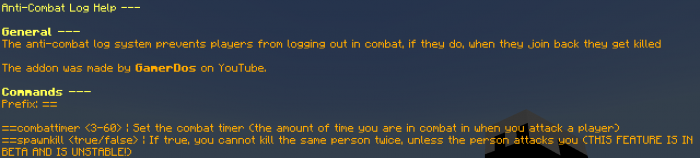
1. ==help
This command shows you all commands ingame

2. ==combattimer <3-60>
This command changes the amount of time you’re in combat in

3. ==spawnkill
This command turns Anti-Spawn Kill on and off

Welcome Message
When you join, you are greeted with a welcome message

Anti-Spawn Kill (Unstable, recommended to be turned off)
How it works
It detects when you attack a player, then it detects if the player is at 0 health, if they are, it gives you a tag and if you kill the player again with the tag, it kills you, to remove the tag, you must get attacked by the player you killed
Experimental Features
- Beta APIS


Showcase
If you still need more information, go to the YouTube video!:
Terms (VERY IMPORTANT):
You are allowed to:
- Showcase this addon WITH CREDITING
- Use this addon in your worlds/servers/realms
You are NOT allowed to:
- Repost this addon to other sites
- Create your own download link
- Claim this addon as your own
Currently, this addon only works on 1.19.50+ and the addon is compatible with all addons, including anticheats
Installation
- Click download link
- Press blue button
Android and IOS
- Go to your file explorer
- Search “Anti-Combat Log”
- The addon should show up as “Anti-Combat Log.mcaddon“, if it shows up as “Anti-Combat Log.mcaddon.zip“, rename it to “Anti-Combat Log.mcaddon“
- Open the Anti-Combat Log.mcaddon file
Windows
- Go to your file explorer
- Click on downloads
- Double click on “Anti-Combat Log.mcaddon” (Open the Anti-Combat Log.mcaddon file)
If you download the zip:
- Extract the zip
- Move the Lifesteal BP folder to your behavior packs folder
- Move the Lifesteal RP folder to your resource packs folder
FOLDERS:
PC:
BP – C:UsersHpAppDataLocalPackagesMicrosoft.MinecraftUWP_8wekyb3d8bbweLocalStategamescom.mojangresource_packs
RP – C:UsersHpAppDataLocalPackagesMicrosoft.MinecraftUWP_8wekyb3d8bbweLocalStategamescom.mojangbehavior_packs
ANDROID:
BP – storage/emulated/0/Android/data/com.mojang.minecraftpe/files/games/com.mojang/behavior_packs
RP – storage/emulated/0/Android/data/com.mojang.minecraftpe/files/games/com.mojang/resource_packs
IOS:
Search com.mojang in files app
FAQ
- The addon isn’t working, why?
You need to turn on experimental features
creator:
Downloads
- Linkvertise Download (DO NOT CLICK ON SUS ADS!)
- Join the discord! (Ad-free download)
- Subscribe to my YouTube to support me!