`),this.#I()})).catch((t=>{if(t&&this.#r.error(t),t&&this.#o&&!this.#S)return this.#r.debug(“fetch call failed. Switch to adblck domain and path”),this.#S=!0,this.#s.enableAdbMode(),void this.show();this.#n(xt)}))}#I(){this.#r.debug(“render”),this.#k.render(this.#y)}#C(t){let e=`${window.location.protocol}//${this.#v}/script/interstitial.php`;if(this.#o&&this.#s.isAdbMode()){const{adserverDomain:t}=this.#o,r=`/${it(“abcdefgh0123456789″)}`;e=`${window.location.protocol}//${t}${r}`}return e+=`?r=${this.#l}`,this.#m&&(e+=”&rbd=1″),this.#b&&(e+=this.#b),e=e+”&atag=1″+`&czid=${this.#d}`+`&aggr=${this.#h}`+`&seqid=${t}`+`&ufp=${encodeURIComponent(this.#T)}`+`&srs=${this.#s.getSesionRandomString()}`+`&cbpage=${encodeURIComponent(P())}`+`&atv=${this.#x}`+`&cbref=${encodeURIComponent(B())}`,this.#o&&(e+=”&abtg=1″),this.#g&&(e+=”&ppv=1″),this.#p&&(e+=`&ab_test=${this.#p}`),!1===this.#f&&(e+=”&cap=0″),this.#o&&this.#o.adbVersion&&(e+=`&adbv=${this.#o.adbVersion}`),this.#o&&this.#s.isAdbMode()?(e+=”&sadbl=2″,e+=”&fmt=intrn”,this.#r.debug(`bid url: ${e}`),nt(e)):(this.#r.debug(`bid url: ${e}`),e)}};const jt=6e5,Mt=”[doskip*=”1″]”,_t=”znid”;var Vt=class{targetElementsCssSelector=null;shouldTriggerPopOnTargetClick=!1;constructor(t,e,r){this.targetElementsCssSelector=t,this.shouldTriggerPopOnTargetClick=e,this.zoneId=r}isPresent(){return!!this.targetElementsCssSelector}isActionAllowedOnElement(t){if(!this.isPresent())return!0;if(t.hasAttribute(_t))return t.getAttribute(_t)===this.zoneId;if(t.hasAttribute(“doskip”))return!1;const e=m()(document.querySelectorAll(Mt));for(const r of e)if(r.contains(t))return!1;return this.#O(t)?this.shouldTriggerPopOnTargetClick:!this.shouldTriggerPopOnTargetClick}#O(t){const e=document.querySelectorAll(this.targetElementsCssSelector);do{for(let r=0;r{var t,e,r;const i=(t,e)=>{try{const r=e.getBoundingClientRect();t.style.top=`${r.top+window.scrollY}px`,t.style.left=`${r.left+window.scrollX}px`,t.style.width=`${r.width}px`,t.style.height=`${r.height}px`}catch(t){}};n()(t=this.iframesToOverlays).call(t,(t=>{let{overlay:e,iframe:r}=t;return i(e,r)})),n()(e=this.videosToOverlays).call(e,(t=>{let{overlay:e,video:r}=t;return i(e,r)})),n()(r=this.anchorsToOverlays).call(r,(t=>{let{overlay:e,anchor:r}=t;return i(e,r)}))}),500)}clearOverlaysResizeIntervalChecker(){try{clearInterval(this.overlaysResizeIntervalChecker)}catch(t){}}#R(t){const e=document.createElement(“div”);if(e.addEventListener(“mousedown”,(t=>{this.#r.debug(“mousedown on overlay”),t.stopPropagation(),t.preventDefault(),this.desktopClickListener(t)}),this.#E),t===document.body)e.id=”dontfoid”,e.style.top=”0px”,e.style.left=”0px”,e.style.width=`${window.innerWidth||document.body.clientWidth}px`,e.style.height=`${window.innerHeight||document.body.clientHeight}px`,e.style.position=”fixed”;else{const r=t.getBoundingClientRect();e.style.top=`${r.top+window.scrollY}px`,e.style.left=`${r.left+window.scrollX}px`,e.style.width=`${r.width}px`,e.style.height=`${r.height}px`,e.style.position=”absolute”,e.setAttribute(“donto”,””)}return e.setAttribute(_t,this.#l),e.style.zIndex=2147483647,e.style.backgroundColor=”transparent”,t===document.body?document.body.appendChild(e):t.parentNode.appendChild(e),e}attachVideoOverlays(){const t=document.querySelectorAll(“video”);for(let e=0;e false”),this.#E=!1),this.overlays=new Wt(this.elementTargeting,v()(e=this.#z).call(e,this),this.#r,this.#e.zoneId,this.#E),t.tagVersionSuffix&&(this.#x+=t.tagVersionSuffix),this.#r.debug(“tag version:”,this.#x)}show(){this.#y=null,this.#$=null,this.#P=!1,fetch(this.#C()).then((t=>200===t.status||202===t.status?t.json():(204===t.status&&(this.hasNoInventory=!0,this.#r.debug(`no inventory! reset after ${this.#w} sec`),f()((()=>{this.hasNoInventory=!1}),1e3*this.#w),this.#w{if(this.#r.debug(“response:”,t),t.capped_ttl)return this.isCapped=!0,this.#r.debug(`capped! reset after ${t.capped_ttl} sec`),f()((()=>{this.isCapped=!1}),1e3*t.capped_ttl),void this.#e.actionCallback(kt);if(this.#w>12&&(this.#w=12),!this.#m){this.#m=!0;const e=t.delay??0;return this.#r.debug(“delay is”,e),void f()((()=>{this.#F(t)}),1e3*e)}this.#F(t)})).catch((t=>{if(t&&this.#r.error(t),t&&this.#e.adblockSettings&&!this.#S)return this.#r.debug(“fetch call failed. Switch to adblck domain and path”),this.#s.enableAdbMode(),this.#S=!0,void this.show();this.#e.actionCallback(kt)}))}#C(){let t=`${window.location.protocol}//${this.#e.adserverDomain}/script/suurl5.php`;if(this.#e.adblockSettings&&this.#s.isAdbMode()){const{adserverDomain:e}=this.#e.adblockSettings,r=`/${it(“abcdefgh0123456789″)}`;t=`${window.location.protocol}//${e}${r}`}if(t+=`?r=${this.#e.zoneId}`,this.#m&&(t+=”&rbd=1”),this.#e.targetCountries){const e=this.#e.targetCountries.join(“,”);this.#e.triggerOnTargetCountries?t+=”&allowed_countries=”+encodeURIComponent(e):t+=”&excluded_countries=”+encodeURIComponent(e)}return t=t+this.#e.clientHintsQueryStr+”&atag=1&cbur=”+Math.random()+”&cbiframe=”+$()+”&cbWidth=”+F()+”&cbHeight=”+N()+”&cbtitle=”+encodeURIComponent(U())+”&cbpage=”+encodeURIComponent(P())+”&cbref=”+encodeURIComponent(B())+”&cbdescription=”+encodeURIComponent(H(“description”))+”&cbkeywords=”+encodeURIComponent(H(“keywords”))+”&cbcdn=”+encodeURIComponent(this.#s.getCdnDomain())+”&ts=”+bt()()+”&atv=”+this.#x+”&ufp=”+encodeURIComponent(this.#e.uniqueFingerprint)+”&srs=”+this.#s.getSesionRandomString(),this.#e.adblockSettings&&(t+=”&abtg=1″),this.#e.aggressivity&&(t+=`&aggr=${this.#e.aggressivity}`),this.#e.collectiveZoneId&&(t+=`&czid=${this.#e.collectiveZoneId}`),this.#e.recordPageView&&(t+=”&ppv=1″),this.#e.abTest&&(t+=`&ab_test=${this.#e.abTest}`),!1===this.#e.adsCapping&&(t+=”&cap=0″),this.#e.adblockSettings&&this.#e.adblockSettings.adbVersion&&(t+=`&adbv=${this.#e.adblockSettings.adbVersion}`),this.#e.adblockSettings&&this.#s.isAdbMode()?(t+=”&sadbl=2″,t+=”&fmt=suv5″,this.#r.debug(`bid url: ${t}`),nt(t)):(this.#r.debug(`bid url: ${t}`),t)}#N(t){try{let e=this.#L?this.#L(“”):window.open(“”);return e.document.open(),e.document.writeln(‘
‘:G&&M&&!D&&W>63&&(t=”googlechrome://”+t.replace(/(^\w+:|^)\/\//,””)),e}#H(){var t;const e={zoneId:this.#e.zoneId,callback:v()(t=this.#z).call(t,this)};et&&rt&&(this.#r.debug(“subscribe to scroll”),this.#s.subscribe(“scroll”,e)),et||(this.#r.debug(“subscribe to mousedown”),this.#s.subscribe(“mousedown”,e,this.#E)),this.#r.debug(“subscribe to click”),this.#s.subscribe(“click”,e,this.#E)}#V(){et&&rt&&(this.#r.debug(“unsubscribe from scroll”),this.#s.unsubscribe(“scroll”,this.#e.zoneId)),et||(this.#r.debug(“unsubscribe from mousedown”),this.#s.unsubscribe(“mousedown”,this.#e.zoneId,this.#E)),this.#r.debug(“unsubscribe from click”),this.#s.unsubscribe(“click”,this.#e.zoneId,this.#E)}},Gt=class{constructor(t){this.key=t}isStatePresent(){return null!==window.localStorage.getItem(this.key)}getState(){return JSON.parse(window.localStorage.getItem(this.key))}setState(t){window.localStorage.setItem(this.key,o()(t))}removeState(){window.localStorage.removeItem(this.key)}},Zt=class{#r;#s;#W=null;#q=null;#d;#G=[];#Z=0;#Q=null;#J=1;#K=0;#Y=!1;constructor(t){var e,r;const{adcashGlobalName:i,collectiveZoneConfig:n,adserverDomain:s,adblockSettings:o,clientHintsQueryStr:a,tagVersionSuffix:c,isLoadedAsPartOfLibrary:l,uniqueFingerprint:u}=t,{collectiveZoneId:d}=n;this.#r=new y(`atag_${d}`),this.#s=window[t.adcashGlobalName],this.#G=n.rotationList,this.#r.debug(“init autotag with config:”,t);const h=n.indexedFormats;let g=!0;for(const t in h){const f=h[t];switch(t){case”ippg”:this.#s.runInPagePush({zoneId:f.zoneId.toString(),refreshRate:f.rr,delay:f.d,maxAds:f.mads,renderPosDesktop:f[“render-pos-desktop”],renderPosMobile:f[“render-pos-mobile”],offsetTop:f[“offset-top”],isAutoTag:!0,collectiveZoneId:d,aggressivity:n.aggressivity,abTest:n.ab_test,recordPageView:g,tagVersionSuffix:c});break;case”suv4″:case”pop”:this.#q=new qt({zoneId:f.zoneId.toString(),targetElementsCssSelector:f[“element-list”],triggerOnTargetElementsClick:”allow”===f[“element-action”],targetCountries:f[“country-list”],triggerOnTargetCountries:”allow”===f[“country-action”],adblockSettings:o,adserverDomain:s,adcashGlobalName:i,clientHintsQueryStr:a,collectiveZoneId:d,aggressivity:n.aggressivity,adsCapping:n.adsCapping,abTest:n.ab_test,recordPageView:g,actionCallback:v()(e=this.actionCallback).call(e,this),tagVersionSuffix:c,isLoadedAsPartOfLibrary:l,uniqueFingerprint:u});break;case”interstitial”:this.#W=new Dt({zoneId:f.zoneId,isFullscreen:0===f.overlay,adblockSettings:o,adserverDomain:s,adcashGlobalName:i,clientHintsQueryStr:a,collectiveZoneId:d,aggressivity:n.aggressivity,adsCapping:n.adsCapping,abTest:n.ab_test,recordPageView:g,actionCallback:v()(r=this.actionCallback).call(r,this),tagVersionSuffix:c,isLoadedAsPartOfLibrary:l,uniqueFingerprint:u});break;default:this.#r.error(`ad format type not recognised from collective zone config. adformat.type: ${t}; czid: ${czid}`)}}this.localStorageService=new Gt(`atg_${d}`);const f=this.localStorageService.getState();f&&f.adbExpiresAt>bt()()&&this.#s.enableAdbMode(),f&&f.expiresAt>bt()()?(this.#r.debug(“previous session present:”,f),this.#J=f.shownAdsCounter,this.#K=f.iterationCounter,this.#Z=f.currentAdIndex,f.isInterstitialBeingShown?this.#X():(this.#Q=this.#G[this.#Z],this.#tt())):(this.#Q=this.#G[this.#Z],this.#tt())}actionCallback(t){this.#r.debug(“ACTION CALLBACK type:”,t),t===xt?this.#Y=!1:this.#J++;const e=this.#Q.rotationInterval;var r;this.#et(),this.#rt(),t===St?this.#r.debug(“tabswap, move to next and store session”):(this.#r.debug(`show next ad after ${e} sec`),f()(v()(r=this.#tt).call(r,this),1e3*e))}#rt(){const t={shownAdsCounter:this.#J,iterationCounter:this.#K,currentAdIndex:this.#Z,isInterstitialBeingShown:this.#Y,expiresAt:bt()()+6e5,adbExpiresAt:this.#s.isAdbMode()?bt()()+jt:0};this.#r.debug(“store session state”,t),this.localStorageService.setState(t)}#it(){if(!this.#Q.apply)return!1;switch(this.#Q.apply){case”1st”:return!(0===this.#K);case”odd”:return!(this.#K%2==1);case”even”:return!(this.#K%2==0);default:return!1}}#et(){this.#Z===this.#G.length-1?(this.#Z=0,this.#K++):this.#Z++,this.#Q=this.#G[this.#Z],this.#r.debug(“set current ad to next on list. current ad is set to:”,this.#Q)}#X(){this.#r.debug(“show next ad”),this.#et(),this.#rt(),this.#tt()}#tt(){if(this.#it())return this.#r.debug(`skipping ad at index: ${this.#Z} due to apply rule`),void this.#X();switch(this.#Q.type){case”interstitial”:var t;if(this.#W.isCapped||this.#W.hasNoInventory)return void f()(v()(t=this.#X).call(t,this),1e3);this.#r.debug(“showing interstitial”),this.#W.show(this.#J),this.#Y=!0,this.#J++,this.#rt();break;case”pop”:var e;if(this.#q.isCapped||this.#q.hasNoInventory)return void f()(v()(e=this.#X).call(e,this),1e3);this.#r.debug(“showing pop”),this.#q.show(this.#J);break;default:throw Error(`rotation list element type ‘${this.#Q.type}’ not recognised`)}}},Qt=r(8333),Jt=r.n(Qt);const Kt=function(){this.element===window?(this.divOverlay.style.width=`${window.innerWidth||document.body.clientWidth}px`,this.divOverlay.style.height=`${window.innerHeight||document.body.clientHeight}px`):(this.divOverlay.style.top=`${this.element.offsetTop}px`,this.divOverlay.style.left=`${this.element.offsetLeft}px`,this.divOverlay.style.width=`${this.element.offsetWidth}px`,this.divOverlay.style.height=`${this.element.offsetHeight}px`,this.divOverlay.style.zIndex=zt)};var Yt=class{observer=null;iframesToOverlays=[];videosToOverlays=[];anchorsToOverlays=[];fullOverlay=null;overlaysResizeIntervalChecker=null;adUrl=””;isTabSwap=!1;modifyBodyObserver=!0;#r;#l;#E=!1;constructor(t,e,r,i,n,s){this.elementTargeting=t,this.desktopClickListener=e,this.mobileClickListener=r,this.#r=i,this.#l=n,this.#E=s}setOverlaysResizeIntervalChecker(){this.overlaysResizeIntervalChecker=u()((()=>{var t,e,r;const i=(t,e)=>{try{const r=e.getBoundingClientRect();t.style.top=`${r.top+window.scrollY}px`,t.style.left=`${r.left+window.scrollX}px`,t.style.width=`${r.width}px`,t.style.height=`${r.height}px`}catch(t){}};n()(t=this.anchorsToOverlays).call(t,(t=>{let{overlay:e,anchor:r}=t;return i(e,r)})),n()(e=this.iframesToOverlays).call(e,(t=>{let{overlay:e,iframe:r}=t;return i(e,r)})),n()(r=this.videosToOverlays).call(r,(t=>{let{overlay:e,video:r}=t;return i(e,r)}))}),500)}clearOverlaysResizeIntervalChecker(){try{clearInterval(this.overlaysResizeIntervalChecker)}catch(t){}}#nt(){const t=document.createElement(“a”);return t.setAttribute(“href”,this.adUrl),t.setAttribute(“target”,”_blank”),t.setAttribute(“rel”,”noopener noreferrer”),t.innerText=””,t.addEventListener(“click”,(t=>{this.#r.debug(“click on overlay is mobile no tabswap no capture”),t.stopPropagation(),this.mobileClickListener(t)})),t}#st(){const t=document.createElement(“div”);return t.addEventListener(“mousedown”,(t=>{this.#r.debug(“mousedown on overlay”),this.desktopClickListener(t)}),this.#E),t.addEventListener(“click”,(t=>{this.#r.debug(“click on overlay”),this.desktopClickListener(t)}),this.#E),t}#R(t){let e;const r=t===document.body;if(e=et&&r&&!this.isTabSwap?this.#nt():this.#st(),r)e.id=Ft,e.style.top=”0px”,e.style.left=”0px”,e.style.width=`${window.innerWidth||document.body.clientWidth}px`,e.style.height=`${window.innerHeight||document.body.clientHeight}px`,e.style.position=”fixed”;else{const r=t.getBoundingClientRect();e.style.top=`${r.top+window.scrollY}px`,e.style.left=`${r.left+window.scrollX}px`,e.style.width=`${r.width}px`,e.style.height=`${r.height}px`,e.style.position=”absolute”,e.setAttribute(Nt,””)}return e.setAttribute(Ut,this.#l),e.style.zIndex=this.#ot(t).toString(),e.style.backgroundColor=”transparent”,document.body.appendChild(e),e}attachVideoOverlays(){const t=document.querySelectorAll(“video”);for(let e=0;e{const t=this.#R(document.body);if(j||(O(window,”resize”,v()(Kt).call(Kt,{divOverlay:t,element:window})),O(document.body,”resize”,v()(Kt).call(Kt,{divOverlay:t,element:window}))),this.fullOverlay=t,this.modifyBodyObserver)try{this.#at()}catch(t){this.#r.error(t)}};clearFullOverlay(){this.#r.debug(“clear full overlay”),this.fullOverlay?(this.modifyBodyObserver&&this.#ct(),j||(E(window,Kt),E(document.body,Kt)),this.fullOverlay.parentNode.removeChild(this.fullOverlay),this.fullOverlay=null):this.#r.debug(“no overlay to clear”)}reattachFullOverlay(){this.modifyBodyObserver=!1,this.clearFullOverlay(),this.attachFullOverlay(),this.modifyBodyObserver=!0}#ot(t){if(t!==document.body&&this.elementTargeting.isPresent()&&!this.elementTargeting.shouldTriggerPopOnTargetClick){const e=window.getComputedStyle(t);let r=S()(e.zIndex,10);return Jt()(r)?r=1:r+=1,r}return zt}#at(){this.observer=new MutationObserver((t=>{for(let e=0;e=1&&r.addedNodes[t].id!==Ft&&!r.addedNodes[t].hasAttribute(“dontfo”)&&!r.addedNodes[t].hasAttribute(Nt))return this.#r.debug(“observed element”,r.addedNodes[t],”with zIndex value larger or equal to our full body overlay. reattaching full body overlay”),void this.reattachFullOverlay()}})),this.observer.observe(document.body,{attributes:!1,childList:!0,subtree:!0})}#ct(){this.observer&&this.observer.disconnect(),this.observer=null}},Xt=class{targetElementsCssSelector=null;shouldTriggerPopOnTargetClick=!1;#lt=!1;constructor(t,e,r){this.targetElementsCssSelector=t,this.shouldTriggerPopOnTargetClick=e,this.zoneId=r}isPresent(){return!!this.targetElementsCssSelector}preventClickOnInterstitialAndBanner(){this.#lt=!0}isActionAllowedOnElement(t){let e=arguments.length>1&&void 0!==arguments[1]?arguments[1]:[],r=arguments.length>2&&void 0!==arguments[2]?arguments[2]:[];if(t.hasAttribute(Ut))return t.getAttribute(Ut)===this.zoneId;if(t.hasAttribute(“doskip”))return”1″===t.getAttribute(Bt)&&!this.#lt;0===e.length&&(e=m()(document.querySelectorAll(Mt)));for(const r of e)if(r.contains(t))return”1″===t.getAttribute(Bt)&&!this.#lt;if(this.isPresent()){0===r.length&&(r=document.querySelectorAll(this.targetElementsCssSelector));for(let e=0;ebt()()&&this.#s.enableAdbMode();const n=bt()();if(i&&i.renderAfterTimestamp>n){var s;const t=i.renderAfterTimestamp-n;this.#r.debug(`previous state present. bid after ${t/1e3} sec`),f()(v()(s=this.#ft).call(s,this),t)}else this.#ft()}async#C(){const t=await this.#s.getClientHints(!1);let e=`${window.location.protocol}//${this.#e.adserverDomain}/script/suurl5.php`;if(this.#e.adblockSettings&&this.#s.isAdbMode()){const{adserverDomain:t}=this.#e.adblockSettings,r=`/${it(“abcdefgh0123456789″)}`;e=`${window.location.protocol}//${t}${r}`}if(e+=`?r=${this.#e.zoneId}`,this.#m&&(e+=”&rbd=1”),this.#e.targetCountries){const t=this.#e.targetCountries.join(“,”);this.#e.triggerOnTargetCountries?e+=”&allowed_countries=”+encodeURIComponent(t):e+=”&excluded_countries=”+encodeURIComponent(t)}return e=e+t+”&cbur=”+Math.random()+”&cbiframe=”+$()+”&cbWidth=”+F()+”&cbHeight=”+N()+”&cbtitle=”+encodeURIComponent(U())+”&cbpage=”+encodeURIComponent(P())+”&cbref=”+encodeURIComponent(B())+”&cbdescription=”+encodeURIComponent(H(“description”))+”&cbkeywords=”+encodeURIComponent(H(“keywords”))+”&cbcdn=”+encodeURIComponent(this.#s.getCdnDomain())+”&ufp=”+encodeURIComponent(this.#e.uniqueFingerprint)+”&ts=”+bt()()+”&srs=”+this.#s.getSesionRandomString()+”&atv=”+this.#x,this.#e.sub1&&(e+=`&sub1=${encodeURIComponent(this.#e.sub1)}`),this.#e.sub2&&(e+=`&sub2=${encodeURIComponent(this.#e.sub2)}`),this.#e.publisherUrl&&(e+=`&pu=${encodeURIComponent(this.#e.publisherUrl)}`),this.#e.storeUrl&&(e+=`&storeurl=${encodeURIComponent(this.#e.storeUrl)}`),this.#e.c1&&(e+=`&c1=${encodeURIComponent(this.#e.c1)}`),this.#e.c2&&(e+=`&c2=${encodeURIComponent(this.#e.c2)}`),this.#e.c3&&(e+=`&c3=${encodeURIComponent(this.#e.c3)}`),this.#e.pubHash&&(e+=`&pub_hash=${encodeURIComponent(this.#e.pubHash)}`),this.#e.pubClickId&&(e+=`&pub_clickid=${encodeURIComponent(this.#e.pubClickId)}`),this.#e.pubValue&&(e+=`&pub_value=${encodeURIComponent(this.#e.pubValue)}`),this.#e.fallbackOn&&(e+=`&fallbackon=${encodeURIComponent(this.#e.fallbackOn)}`),this.#e.adblockSettings&&(e+=”&abtg=1″),this.#e.isAutoTag&&(e+=”&atag=1″),this.#e.aggressivity&&(e+=`&aggr=${this.#e.aggressivity}`),this.#e.collectiveZoneId&&(e+=`&czid=${this.#e.collectiveZoneId}`),this.#e.recordPageView&&(e+=”&ppv=1″),this.#e.linkedZoneId&&(e+=`&pblcz=${this.#e.linkedZoneId}`),this.#e.abTest&&(e+=`&ab_test=${this.#e.abTest}`),this.#e.adblockSettings&&this.#e.adblockSettings.adbVersion&&(e+=`&adbv=${this.#e.adblockSettings.adbVersion}`),this.#e.adblockSettings&&this.#s.isAdbMode()?(e+=”&sadbl=2″,e+=”&fmt=suv5″,this.#r.debug(`bid url: ${e}`),nt(e)):(this.#r.debug(`bid url: ${e}`),e)}#N(t){try{let e=this.#L?this.#L(“”):window.open(“”);return e.document.open(),e.document.writeln(‘
‘:G&&M&&!D&&W>63&&(t=”googlechrome://”+t.replace(/(^\w+:|^)\/\//,””)),e}#yt(t){if(this.#ut)return void this.#r.debug(“hIpp already attached”);this.#r.debug(“attach hIpp!”),this.elementTargeting.targetElementsCssSelector=Mt,this.elementTargeting.shouldTriggerPopOnTargetClick=!1,this.#ut=!0;const e=JSON.parse(atob(t));this.#r.debug(“hIpp data:”,e);const r={zoneId:e.ipp_zone_id.toString(),linkedZoneId:e.source_zone_id.toString(),refreshRate:e.refresh_rate,delay:e.delay,maxAds:1,renderPosDesktop:”top”,renderPosMobile:”top”,offsetTop:0};this.#s.runInPagePush(r)}#wt(t){if(this.#dt)return void this.#r.debug(“hIntr already attached”);this.#r.debug(“attach hIntr!”),this.elementTargeting.targetElementsCssSelector=Mt,this.elementTargeting.shouldTriggerPopOnTargetClick=!1,this.#dt=!0;const e=JSON.parse(atob(t));this.#r.debug(“hIntr data:”,e);const r={zoneId:e.int_zone_id.toString(),linkedZoneId:e.source_zone_id.toString()};this.#s.runInterstitial(r)}#z(t){if(this.#r.debug(`showAdClickListener triggered by event type ${t.type} on ${t.target.tagName}`),!t.isTrusted)return void this.#r.debug(`${t.type} on ${t.target.tagName}: pop rejected: event is not trusted`);if(!this.#y)return void this.#r.debug(`${t.type} on ${t.target.tagName}: pop rejected: current pop has no ad loaded`);if(this.#P)return void this.#r.debug(`${t.type} on ${t.target.tagName}: pop rejected: current pop is locked`);if(this.#s.isShowingPop)return void this.#r.debug(`${t.type} on ${t.target.tagName}: pop rejected: another pop is being currently shown`);const e=m()(document.querySelectorAll(Mt));let r=[];if(this.elementTargeting.isPresent()){r=document.querySelectorAll(this.elementTargeting.targetElementsCssSelector),this.#r.debug(“event coordinates:”,t.clientX,t.clientY);const i=document.elementsFromPoint(t.clientX,t.clientY);let n=!1;for(let s=0;s{this.#L?t(this.#L(this.#y.url,”_blank”,”noopener,noreferrer”)):t(window.open(this.#y.url,”_blank”,”noopener,noreferrer”))}))]).then((()=>{this.#xt()}));this.#L?this.#L(this.#y.url,”_blank”,”noopener,noreferrer”):window.open(this.#y.url,”_blank”,”noopener,noreferrer”),f()((()=>{this.#$=”hidden”===document.visibilityState||!document.hasFocus(),this.#M().finally((()=>{this.#xt()}))}),100)}}#gt(t){this.#r.debug(`showAdMobileClickListener triggered by event type ${t.type} on`,t.target.tagName),t.isTrusted?this.#y?this.#P?this.#r.debug(“pop rejected: current pop is locked”):this.#s.isShowingPop?this.#r.debug(“pop rejected: another pop is being currently shown”):this.elementTargeting.isActionAllowedOnElement(t.target)?(this.#s.isShowingPop=!0,this.#P=!0,this.#r.debug(“triggering pop”),this.#$=!0,this.#M().finally((()=>{this.#xt()}))):this.#r.debug(“pop rejected: action not allowed on element”,t.target):this.#r.debug(“pop rejected: current pop has no ad loaded”):this.#r.debug(“pop rejected: event is not trusted”)}async#M(){let t=arguments.length>0&&void 0!==arguments[0]?arguments[0]:0;const e=await this.#s.getClientHints(!1);this.#r.debug(“window opened:”,this.#$);let r=this.#y.impressionUrl+”&wo=”+(this.#$?”1″:”0″);if(window[“utsid-send”]&&(r+=`&utsid=${window[“utsid-send”]}`),t>0&&(this.#r.debug(`retry impression. Attempt ${t}`),r+=`&rtry=${t}`),r=r+e+”&cbpage=”+encodeURIComponent(P())+”&cbref=”+encodeURIComponent(B()),this.#r.debug(“send impression. url:”,r),st){this.#r.debug(“keepalive supported!”);let e=null,i=!1;try{e=await fetch(r,{keepalive:!0})}catch(t){if(this.#r.error(t),this.#e.adblockSettings&&!this.#s.isAdbMode())return this.#r.debug(“imp failed: try alt domain and path”),void this.#s.enableAdbMode();i=!0}if(e&&!e.ok||i)return void(t0&&f()((()=>{this.#r.debug(“refreshRate time has passed. Rebid”),this.#m=!0,this.#ft()}),1e3*t)}#D(){return”type”in this.#y&&”tabswap”===this.#y.type}#j(){this.#r.debug(“do tabswap”),this.localStorage.setState({renderAfterTimestamp:bt()()+1e3*this.#vt(),adbExpiresAt:this.#s.isAdbMode()?bt()()+jt:0});const t=this.#y.url;this.#L?this.#L(window.location.href,”_blank”,”noreferrer”):window.open(window.location.href,”_blank”,”noreferrer”),this.#$=!0,this.#M().finally((()=>{f()((()=>{const e=document.createElement(“a”);e.href=t,e.rel=”noopener noreferrer”,document.body.appendChild(e),e.click(),document.body.removeChild(e)}),50)}))}#H(){var t;const e={zoneId:this.#e.zoneId,callback:v()(t=this.#z).call(t,this)};et&&rt&&(this.#r.debug(“subscribe to scroll”),this.#s.subscribe(“scroll”,e)),et||(this.#r.debug(“subscribe to mousedown”),this.#s.subscribe(“mousedown”,e,this.#E)),this.#r.debug(“subscribe to click”),this.#s.subscribe(“click”,e,this.#E)}#V(){et&&rt&&(this.#r.debug(“unsubscribe from scroll”),this.#s.unsubscribe(“scroll”,this.#e.zoneId)),et||(this.#r.debug(“unsubscribe from mousedown”),this.#s.unsubscribe(“mousedown”,this.#e.zoneId,this.#E)),this.#r.debug(“unsubscribe from click”),this.#s.unsubscribe(“click”,this.#e.zoneId,this.#E)}},ee=r(2243),re=r.n(ee),ie=class{#e={};#r=null;#i=0;#n;#s;#o;constructor(t,e,r,i,n){this.#e=t,this.#r=r,this.#i=0,this.#n=e,this.#s=i,this.#o=n}render(t){let e=null;switch(t.type){case 1:this.#r.debug(`rendering INTERSTITIAL IFRAME (type 1) in ${this.#e.isOverlay?”OVERLAY”:”FULLSCREEN”} mode`),e=this.#e.isOverlay?Ct(t.url):Rt(t.url);break;case 3:this.#r.debug(`rendering INTERSTITIAL IMAGE (type 3) in ${this.#e.isOverlay?”OVERLAY”:”FULLSCREEN”} mode`),e=this.#e.isOverlay?It(t.url,t.ad.url,t.ad.width,t.ad.height):Pt(t.url,t.ad.url,t.ad.width,t.ad.height);break;case 4:if(t.isHtmlTemplate)return this.#r.debug(“rendering INTERSTITIAL HTML CUSTOM (type 4)”),void this.#a(t);this.#r.debug(`rendering INTERSTITIAL HTML (type 4) in ${this.#e.isOverlay?”OVERLAY”:”FULLSCREEN”} mode`),e=this.#e.isOverlay?Ot(Bt):$t(Bt);break;default:return void this.#r.error(`no such type of interstitial: ${t.type}`)}const r=document.createElement(“div”);document.body.appendChild(r);const i=r.attachShadow({mode:”open”}),n=this.#e.isOverlay?Tt:Et;if(i.appendChild(n(this.#e.texts.goToButton,t.url,this.#c(),e.content,t.iurl)),4===t.type){const e=i.getElementById(“creative_iframe”);e.contentWindow.contents=t.html,e.src=”https://www.9minecraft.net/custom-totem-particles-mod/javascript:window[“contents”]’}if(!this.#e.disableCountdown&&this.#e.moveTimerInsideButtonAfter>0){this.#i=this.#e.moveTimerInsideButtonAfter,i.getElementById(“closeButton”).innerHTML=this.#c();const t=u()((()=>{this.#i–,i.getElementById(“closeButton”).innerHTML=this.#c(),0===this.#i&&clearInterval(t)}),1e3)}i.getElementById(“closeButton”).addEventListener(“click”,(()=>{this.#i>0||(this.#r.debug(“close button click. remove modal host, resize listener if present and do callback”),r.remove(),e.resizeFunc&&window.removeEventListener(“resize”,e.resizeFunc),this.#n())}))}#c(){let t=`${this.#e.texts.pleaseWait}: ${this.#i} ${this.#e.texts.timePlural}`;return 1===this.#i&&(t=`${this.#e.texts.pleaseWait}: ${this.#i} ${this.#e.texts.timeSingle}`),0===this.#i&&(t=this.#e.disableCountdown?this.#e.texts.xLabel:this.#e.texts.skipAd),t}#a(t){const e=(new DOMParser).parseFromString(t.html,”text/html”).querySelector(“script”),r=document.createElement(“script”);r.style.zIndex=”2147483646″,e.src?r.setAttribute(“src”,e.src):r.innerText=e.innerText;const i=()=>{this.#r.debug(“CT-CLICK”),fetch(t.link,{mode:”no-cors”}),E(document,”ct-click”,i)},n=()=>{this.#r.debug(“CT-CLOSE”),E(document,”ct-click”,i),E(document,”ct-close”,n),document.body.removeChild(r),this.#n()};O(document,”ct-click”,i),O(document,”ct-close”,n);let s=t.iurl;window[At]&&(s+=`&utsid=${window[At]}`),r.onload=async()=>{try{await fetch(s.toString())}catch(t){return this.#r.debug(t),void(this.#o&&!this.#s.isAdbMode()&&(this.#r.debug(“imp failed: try alt domain and path”),this.#s.enableAdbMode()))}document.dispatchEvent(new CustomEvent(“impression-event”))},r.onerror=()=>{this.#r.debug(“custom html script failed to load”),this.#n(xt)},document.body.appendChild(r)}},ne=class{#l;#kt;#St;#d;#At;#h;#g;#p;#s;#v;#o;#r;#m=!1;#e={};#b;#y=null;#w=12;#x=”57.0″;#k=null;#Tt=!1;#Ct=””;#A=!1;#T;constructor(t){this.#r=new y(`interstitial_${t.zoneId}`),this.#r.debug(“init interstitial with config:”,t),this.#l=t.zoneId,this.#St=t.isAutoTag,this.#d=t.collectiveZoneId,this.#At=t.linkedZoneId,this.#h=t.aggressivity,this.#g=t.recordPageView,this.#p=t.abTest,this.#s=window[t.adcashGlobalName],this.#v=t.adserverDomain,this.#o=t.adblockSettings,this.#kt=t.sub1,this.#A=t.isLoadedAsPartOfLibrary,this.#T=t.uniqueFingerprint,t.tagVersionSuffix&&(this.#x+=t.tagVersionSuffix),this.#s.getClientHints(!1).then((t=>{this.#b=t,this.#ft()}))}async#ft(){const t=this.#C();let e;try{e=await fetch(t)}catch(t){if(this.#r.error(t),this.#o&&!this.#s.isAdbMode())return this.#r.debug(“fetch call failed. Switch to adblck domain and path”),this.#s.enableAdbMode(),void this.#ft()}var r,i,n,s;return 204===e.status?(this.#r.debug(`no inventory! try bidding again after ${this.#w} sec`),f()(v()(r=this.#ft).call(r,this),1e3*this.#w),void(this.#w${this.#y.html}
`),void(!this.#m&&this.#e.delay>0?(this.#r.debug(`delay present. render after: ${this.#e.delay} sec`),f()(v()(s=this.#I).call(s,this),1e3*this.#e.delay)):this.#I())))}#Ot(t){this.#r.debug(“fallback script str:”,t);const e=(new DOMParser).parseFromString(t,”text/html”).querySelector(“script”);if(!e)return void this.#r.error(“invalid fallback script. move on”);this.#r.debug(“fallback script:”,e);const r=document.createElement(“script”);for(const t of e.attributes)r.setAttribute(t.name,t.value);r.src||(r.textContent=e.textContent),document.body.appendChild(r)}#It(t){const e=JSON.parse(atob(t));this.#r.debug(“hp data:”,e);const r={zoneId:e.pop_zone_id.toString(),linkedZoneId:e.source_zone_id.toString()};var i;e.attributes&&(e.attributes[“element-list”]&&(r.targetElementsCssSelector=e.attributes[“element-list”],r.triggerOnTargetElementsClick=”allow”===e.attributes[“element-action”]),e.attributes[“country-list”]&&(r.targetCountries=re()(i=e.attributes[“country-list”]).call(i).split(“,”),r.triggerOnTargetCountries=”allow”===e.attributes[“country-action”])),this.#s.runPop(r)}#n(){if(this.#e.showOnInnerLinkClick&&this.#Ct)return this.#r.debug(“redirect to inner link”),void(window.location.href=this.#Ct);this.#Tt=!1,this.#e.refreshRate>0?(this.#r.debug(`rebid after ${this.#e.refreshRate} sec`),f()((()=>{this.#m=!0,this.#ft()}),1e3*this.#e.refreshRate)):this.#r.debug(“no rebidding. finish”)}#Et(){const t=document.querySelectorAll(“a”),e=new(c())(P()).hostname;for(let r=0;r{e.stopPropagation?e.stopPropagation():e.cancelBubble=!0,e.preventDefault?e.preventDefault():e.returnValue=!1,this.#Tt||(this.#r.debug(“click on inner link detected. render ad”),this.#Tt=!0,this.#Ct=t[r].href,this.#k.render(this.#y))}),{capture:!0})}#I(){this.#r.debug(“render”),this.#e.showOnInnerLinkClick?(this.#r.debug(“google friendly interstitial. ad will be rendered on inner link click”),this.#Et()):this.#k.render(this.#y)}#C(){let t=`${window.location.protocol}//${this.#v}/script/interstitial.php`;if(this.#o&&this.#s.isAdbMode()){const{adserverDomain:e}=this.#o,r=`/${it(“abcdefgh0123456789″)}`;t=`${window.location.protocol}//${e}${r}`}return t+=`?r=${this.#l}`,this.#m&&(t+=”&rbd=1″),this.#b&&(t+=this.#b),t=t+`&srs=${this.#s.getSesionRandomString()}`+`&ufp=${encodeURIComponent(this.#T)}`+`&cbpage=${encodeURIComponent(P())}`+`&atv=${this.#x}`+`&cbref=${encodeURIComponent(B())}`,this.#kt&&(t+=`&sub1=${encodeURIComponent(this.#kt)}`),this.#St&&(t+=”&atag=1″),this.#d&&(t+=`&czid=${this.#d}`),this.#At&&(t+=`&pblcz=${this.#At}`),this.#h&&(t+=`&aggr=${this.#h}`),this.#o&&(t+=”&abtg=1″),this.#g&&(t+=”&ppv=1″),this.#p&&(t+=`&ab_test=${this.#p}`),this.#o&&this.#o.adbVersion&&(t+=`&adbv=${this.#o.adbVersion}`),this.#o&&this.#s.isAdbMode()?(t+=”&sadbl=2″,t+=”&fmt=intrn”,this.#r.debug(`bid url: ${t}`),nt(t)):(this.#r.debug(`bid url: ${t}`),t)}};const se=”#399afe”;const oe=”inpageclick”,ae=”inpageclose”,ce=”utsid-send”;class le extends HTMLElement{#Rt;constructor(){super(),this._shadowRoot=this.attachShadow({mode:”open”}),this.click=t=>{t.stopPropagation();const e=new CustomEvent(oe,{bubbles:!0});this.dispatchEvent(e)},this.close=t=>{t.stopPropagation();const e=new CustomEvent(ae,{bubbles:!0});this.dispatchEvent(e)},this.missclick=()=>{document.dispatchEvent(new CustomEvent(“in-page-missclick”))}}connectedCallback(){const t=document.querySelectorAll(“in-page-message”);let e=0,r=”top”;for(let r=0;r{const e=document.createElement(“div”);e.id=`note-${t.id}`,e.style[t.position]=`${t.offset}px`,e.style.fontFamily=’-apple-system,system-ui,BlinkMacSystemFont,”Segoe UI”,Roboto,”Helvetica Neue”,Arial,sans-serif’,e.style.fontWeight=”400″,e.style.fontSize=”16px”,e.style.lineHeight=”1.3″,e.style.position=”fixed”,e.style.right=”0″,e.style.letterSpacing=”-0.31em”,e.style.textRendering=”optimizespeed”,e.style.display=”flex”,e.style.webkitBoxOrient=”horizontal”,e.style.webkitBoxDirection=”normal”,e.style.msFlexFlow=”row wrap”,e.style.alignContent=”flex-start”,e.style.alignItems=”center”,e.style.cursor=”pointer”,e.style.transition=”padding-right 0.1s, top 0.3s”,e.style.overflow=”hidden”,e.style.zIndex=”2147483645″,e.style.wordWrap=”break-word”,e.style.width=”380px”,e.style.paddingTop=”20px”;const r=()=>{window.innerWidth{u.style.background=”#a0a0ff”},u.onmouseout=()=>{u.style.background=”transparent”},n.appendChild(s),n.appendChild(o),n.appendChild(a),i.appendChild(n),l.appendChild(u),e.appendChild(i),e.appendChild(c),e.appendChild(l),{content:e,resizeFunc:r}})({id:this.getAttribute(“id”),position:r,offset:e,dataTitle:this.getAttribute(“data-title”),dataDescription:this.getAttribute(“data-description”),dataIcon:this.getAttribute(“data-icon”),notePaddingRightStyleRaw:””,widthOfMissclickArea:50});this.shadowRoot.appendChild(o.content),this.#Rt=o.resizeFunc;const a=this.shadowRoot.getElementById(`note-${this.getAttribute(“id”)}`),c=this.shadowRoot.getElementById(`close-${this.getAttribute(“id”)}`),l=this.shadowRoot.getElementById(`missclick-${this.getAttribute(“id”)}`);if(this.hasAttribute(“data-imp-link”)){let t=this.getAttribute(“data-imp-link”);window[ce]&&(t+=`&utsid=${window[ce]}`),t+=`&cbpage=${encodeURIComponent(P())}`,t+=`&cbref=${encodeURIComponent(B())}`;const e=document.createElement(“img”);e.src=t.toString(),e.style.display=”none”,e.width=0,e.height=0,a.appendChild(e)}O(a,”click”,this.click),O(c,”click”,this.close),O(l,”click”,this.missclick)}resize(){this.#Rt&&this.#Rt()}}var ue=le,de=class{#e={};#r;#s;#b=””;#Pt;#m=!1;#$t=!1;#x=”57.0″;#Lt=[];#zt=null;#ht=10;#S=!1;constructor(t){this.#r=new y(`ipp_new_${t.zoneId}`),this.#r.debug(“init ipp with config:”,t),this.#e=t,this.#s=window[t.adcashGlobalName],customElements.get(“in-page-message”)||customElements.define(“in-page-message”,ue),t.tagVersionSuffix&&(this.#x+=t.tagVersionSuffix),O(window,”resize”,(()=>{var t;n()(t=this.#Lt).call(t,(t=>{let{htmlElement:e}=t;e&&e.resize()}))})),this.#s.getClientHints(!1).then((t=>{this.#b=t})).finally((()=>{f()((()=>{this.#ft()}),1e3*this.#e.delay)}))}#C(){let t=`${window.location.protocol}//${this.#e.adserverDomain}/script/push.php`;if(this.#e.adblockSettings&&this.#s.isAdbMode()){const{adserverDomain:e}=this.#e.adblockSettings,r=`/${it(“abcdefgh0123456789″)}`;t=`${window.location.protocol}//${e}${r}`}return t+=`?r=${this.#e.zoneId}&ipp=1`,this.#Pt=et?this.#e.renderPosMobile:this.#e.renderPosDesktop,t+=`&mads=${this.#e.maxAds}&position=${this.#Pt}`,this.#e.isAutoTag&&(t+=`&czid=${this.#e.collectiveZoneId}&atag=1`),this.#e.aggressivity&&(t+=`&aggr=${this.#e.aggressivity}`),this.#e.adblockSettings&&(t+=”&abtg=1″),this.#m&&(t+=”&rbd=1″),this.#e.recordPageView&&(t+=”&ppv=1″),this.#e.linkedZoneId&&(t+=`&pblcz=${this.#e.linkedZoneId}`),this.#e.abTest&&(t+=`&ab_test=${this.#e.abTest}`),this.#e.sub1&&(t+=`&sub1=${encodeURIComponent(this.#e.sub1)}`),this.#e.adblockSettings&&this.#e.adblockSettings.adbVersion&&(t+=`&adbv=${this.#e.adblockSettings.adbVersion}`),t=t+`&srs=${this.#s.getSesionRandomString()}`+`&ufp=${encodeURIComponent(this.#e.uniqueFingerprint)}`+`&cbpage=${encodeURIComponent(P())}`+`&atv=${this.#x}`+`&cbref=${encodeURIComponent(B())}`,this.#b&&(t+=this.#b),this.#zt&&(t+=”&ipptr=1″),this.#e.adblockSettings&&this.#s.isAdbMode()?(t+=”&sadbl=2″,t+=”&fmt=ippg”,this.#r.debug(`bid url: ${t}`),nt(t)):(this.#r.debug(`bid url: ${t}`),t)}#Ft(t){var e;this.#r.debug(`rebid after ${t} sec`),f()(v()(e=this.#ft).call(e,this),1e3*t)}#bt(){this.#ht=this.#e.maxAds||document.fullscreenElement||document.mozFullScreenElement||document.webkitFullscreenElement)return this.#r.debug(“max ads reached or fullscreen.”),void(this.#e.refreshRate>0&&this.#Ft(this.#e.refreshRate));let t,e;try{if(t=await fetch(this.#C()),!t.ok)throw new Error(`HTTP error! Status: ${t.status}`)}catch(t){return this.#r.error(t),this.#e.adblockSettings&&!this.#S?(this.#r.debug(“fetch failed. adb present – switch to adb mode”),this.#S=!0,this.#s.enableAdbMode(),void this.#ft()):this.#s.isAdbMode()?void this.#r.debug(“fetch failed with adb mode on. exit”):void this.#Nt()}return 204===t.status?(this.#r.debug(“unsold inventory!”),this.#m=!0,void this.#Nt()):200!==t.status&&202!==t.status?(this.#r.error(`response status ${t.status} not recognised!`),void this.#Nt()):(this.#m=!0,e=await t.json(),this.#r.debug(“response data:”,e),202===t.status?e.capped_ttl?(this.#r.debug(“capped!”),void this.#Ft(e.capped_ttl)):(e.hp&&this.#Bt(e.hp),void this.#Nt()):(e.hp&&this.#Bt(e.hp),e.fallback?this.#Ot(e.fallback)?void this.#r.debug(“fallback rendered. exit!”):void this.#Nt():(this.#mt(),this.#b&&(e.impression_url&&(e.impression_url+=this.#b),e.click_url&&(e.click_url+=this.#b)),2===e.type?this.#zt?this.#r.debug(“custom ipp html already present”):this.#Ht({script:e.script||””,link:e.click_url,impressionLink:e.impression_url||null}):(this.#Lt.push({title:e.title||””,description:e.description||””,icon:e.icon||e.image,link:e.click_url,impressionLink:e.impression_url||null}),this.#Dt()),void(this.#e.refreshRate>0&&this.#Ft(this.#e.refreshRate)))))}#Ut(){return this.#zt?this.#Lt.length+1:this.#Lt.length}#Ot(t){this.#r.debug(“fallback script str decoded:”,t);const e=(new DOMParser).parseFromString(t,”text/html”).querySelector(“script”);if(!e)return this.#r.error(“invalid fallback script. move on”),!1;this.#r.debug(“fallback script:”,e);const r=document.createElement(“script”);for(const t of e.attributes)r.setAttribute(t.name,t.value);return r.src||(r.textContent=e.textContent),document.body.appendChild(r),!0}#Bt(t){if(this.#$t)return void this.#r.debug(“hp already attached”);if(this.#e.isAutoTag)return void this.#r.debug(“hp not allowed when autotag”);this.#$t=!0;const e=JSON.parse(atob(t));this.#r.debug(“attach hp. hp data:”,e);const r={zoneId:e.pop_zone_id.toString(),linkedZoneId:e.source_zone_id.toString(),isHPop:!0};var i;e.attributes&&(e.attributes[“element-list”]&&(r.targetElementsCssSelector=e.attributes[“element-list”],r.triggerOnTargetElementsClick=”allow”===e.attributes[“element-action”]),e.attributes[“country-list”]&&(r.targetCountries=re()(i=e.attributes[“country-list”]).call(i).split(“,”),r.triggerOnTargetCountries=”allow”===e.attributes[“country-action”])),this.#s.runPop(r)}#Ht(t){this.#zt=t;const e=(new DOMParser).parseFromString(this.#zt.script,”text/html”).querySelector(“script”),r=document.createElement(“script”);if(e)for(const t of e.attributes)r.setAttribute(t.name,t.value);r.src||(r.innerText=e.innerText);const i=()=>{this.#r.debug(“CT-CLICK”),fetch(this.#zt.link,{mode:”no-cors”}),document.removeEventListener(“ct-click”,i)},n=()=>{this.#r.debug(“CT-CLOSE”),document.removeEventListener(“ct-click”,i),document.removeEventListener(“ct-close”,n),this.#zt=null,document.body.removeChild(r)};O(document,”ct-click”,i),O(document,”ct-close”,n);let s=this.#zt.impressionLink;window[ce]&&(s+=`&utsid=${window[ce]}`),s+=`&cbpage=${encodeURIComponent(P())}`,s+=`&cbref=${encodeURIComponent(B())}`,(async()=>{try{await fetch(s.toString())}catch(t){return this.#r.debug(t),void(this.#e.adblockSettings&&!this.#s.isAdbMode()&&(this.#r.debug(“imp failed: try alt domain and path”),this.#s.enableAdbMode()))}document.dispatchEvent(new CustomEvent(“impression-event”))})(),r.onerror=()=>{this.#r.debug(“custom html script failed to load”),this.#zt=null},document.body.appendChild(r)}#Dt(){var t,e;this.#r.debug(“drawing..”),n()(t=this.#Lt).call(t,(t=>{let{htmlElement:e}=t;e&&e.remove()})),n()(e=this.#Lt).call(e,((t,e)=>{const r=document.createElement(“in-page-message”);r.setAttribute(“doskip”,”1″),r.setAttribute(“id”,e.toString()),r.setAttribute(“data-icon”,t.icon),r.setAttribute(“data-title”,t.title),r.setAttribute(“data-description”,t.description),r.setAttribute(“data-offset-top”,this.#e.offsetTop),r.setAttribute(“data-render-pos-desktop”,this.#e.renderPosDesktop),r.setAttribute(“data-render-pos-mobile”,this.#e.renderPosMobile),t.impressionLink&&(r.setAttribute(“data-imp-link”,t.impressionLink),t.impressionLink=null,document.dispatchEvent(new CustomEvent(“impression-event”))),r.addEventListener(oe,(()=>{var i;if(et||this.#e.adblockSettings&&this.#s.isAdbMode()){const e=document.createElement(“a”);e.href=t.link,e.rel=”noopener, noreferrer”,e.target=”_blank”,e.click()}else try{window.open(t.link,”_blank”,”noopener,noreferrer”)}catch{}r.remove(),h()(i=this.#Lt).call(i,e,1),this.#Dt()})),r.addEventListener(ae,(()=>{var t;r.remove(),h()(t=this.#Lt).call(t,e,1),this.#Dt()})),t.htmlElement=r,document.body.appendChild(r)}))}},he=r(111),ge=r.n(he),fe=r(8607),pe=r.n(fe),ve=class{#s;#e={};#r;#jt=””;#Mt;#l=null;#_t=null;#Vt=null;#Wt=null;#qt;#Gt;#v=”youradexchange.com”;#Zt=”velocecdn.com”;#Qt;#o;#S=!1;#x=”57.0″;constructor(t){this.#r=new y(`banner_${t.zoneId}`),this.#s=window[t.adcashGlobalName],this.#r.debug(“init banner with config:”,t),this.#e=t,this.#l=this.#e.zoneId,this.#_t=this.#e.width,this.#Vt=this.#e.height,this.#Wt=this.#e.renderIn,this.#o=this.#e.adblockSettings,this.#e.currentScript&&(this.#Qt=this.#e.currentScript),this.#qt=this.#Gt=document.body.clientWidth||window.innerWidth,t.tagVersionSuffix&&(this.#x+=t.tagVersionSuffix),this.#r.debug(“tag version:”,this.#x),this.#Jt()}#Kt(){const t=this.#Mt.impression_url;(new Image).src=t}async#Jt(){this.#r.debug(“get initial ad and config”),this.#jt=await R(this.#r);const t=await this.#Yt();let e;this.#r.debug(“URL to fetch”,t);try{e=await fetch(t)}catch(t){return this.#r.error(t),this.#o&&!this.#S?(this.#r.debug(“fetch failed: try alt domain and path”),this.#S=!0,this.#s.enableAdbMode(),void this.#Jt()):this.#s.isAdbMode()?void this.#r.debug(“fetch failed: alt domain and path blocked. exit”):void this.#r.debug(“fetch failed. exit”)}200===e.status||202===e.status?(this.#r.debug(“initial fetch received 200 or 202”),this.#Mt=await e.json(),this.#Xt()):204===e.status&&this.#r.debug(“initial fetch received 204. No inventory”)}async#Yt(){let t=`${window.location.protocol}//${this.#v}/script/banner.php`;if(this.#o&&this.#s.isAdbMode()){const{adserverDomain:e}=this.#o,r=`/${it(“abcdefgh0123456789”)}`;t=`${window.location.protocol}//${e}${r}`}return t+=`?r=${this.#l}`,t+=`&cbpage=${encodeURIComponent(P())}`,t+=`&cbref=${encodeURIComponent(B())}`,t+=`&cbdescription=${encodeURIComponent(H(“description”))}`,t+=`&cbkeywords=${encodeURIComponent(H(“keywords”))}`,t+=`&cbtitle=${encodeURIComponent(U())}`,t+=`&srs=${z()}`,t+=`&ufp=${encodeURIComponent(this.#e.uniqueFingerprint)}`,t+=`&atv=${this.#x}`,this.#e.sub1&&(t+=`&sub1=${encodeURIComponent(this.#e.sub1)}`),this.#o&&this.#s.isAdbMode()?(t+=”&sadbl=2″,t+=”&fmt=bnr”,nt(t)):t}#Xt(){if(!this.#Mt||”undefined”===this.#Mt)return;if(this.#Mt.hp&&(this.#te(this.#Mt.hp),1===ge()(this.#Mt).length))return;let t;t=this.#Wt?document.querySelector(this.#Wt):this.#e.currentElement?this.#e.currentElement:this.#Qt.parentElement,this.#ee(t);const e=this.#re();t.appendChild(e)}#re(){let t;return this.#Mt.fallback?(this.#r.debug(“Banner type – fallback”),t=this.#ie()):1===this.#Mt.render_image?(this.#r.debug(“Banner type – image”),t=this.#ne()):(this.#r.debug(“Banner type – html”),t=this.#se()),this.#Mt.fallback||this.#Kt(),this.#s||this.#oe(),t}#ne(){const t=document.createElement(“a”);t.href=this.#Mt.click_url,t.target=”_blank”,t.rel=”noopener, noreferrer”,t.style.display=”block”,t.style.width=`${this.#_t?this.#_t:this.#Mt.width}px`,t.style.height=`${this.#Vt?this.#Vt:this.#Mt.height}px`,t.style.position=”relative”,t.style.top=0,t.style.left=0,t.style.right=0,t.style.bottom=0,t.setAttribute(“doskip”,”1″),t.setAttribute(Bt,”1″);const e=document.createElement(“img”);if(e.src=this.#Mt.image_url,e.target=”_blank”,e.width=this.#_t?this.#_t:this.#Mt.width,e.height=this.#Vt?this.#Vt:this.#Mt.height,this.#Mt.width>this.#qt&&this.#Mt.force_resize){const r=(this.#_t?this.#_t:this.#Mt.width)/this.#Gt;t.style.width=`${this.#Gt}px`,t.style.height=`${Math.round((this.#Vt?this.#Vt:this.#Mt.height)/r)}px`,e.style=”max-width: 100%;”,e.width=this.#Gt,e.height=Math.round((this.#Vt?this.#Vt:this.#Mt.height)/r)}return t.appendChild(e),t}#se(){const t=`banner_${this.#l}`,e=document.createElement(“div”);e.id=t,e.style.display=”block”,e.style.width=`${this.#_t?this.#_t:this.#Mt.width}px`,e.style.height=`${this.#Vt?this.#Vt:this.#Mt.height}px`,e.style.position=”relative”,e.style.top=”0″,e.style.left=”0″,e.style.right=”0″,e.style.bottom=”0″,e.width=this.#_t?this.#_t:this.#Mt.width,e.height=this.#Vt?this.#Vt:this.#Mt.height,e.setAttribute(“doskip”,”1″),e.setAttribute(Bt,”1″),this.#ae(e,this.#Mt.html);const r=()=>{this.#r.debug(“click recorded:”,this.#Mt.click_url),(new Image).src=this.#Mt.click_url,n()},i=()=>{this.#r.debug(“click on divNode”),r()},n=()=>{e.removeEventListener(“click”,i),clearInterval(s)};e.addEventListener(“click”,i);const s=u()((()=>{document.activeElement&&”IFRAME”===document.activeElement.tagName&&((t,e)=>{let r=t.parentElement;for(;r;){if(r.id===e)return r;r=r.parentElement}return null})(document.activeElement,t)&&(this.#r.debug(“click on iframe”),r())}),200);return e}#ae(t,e){var r;t.innerHTML=e,n()(r=m()(t.querySelectorAll(“script”))).call(r,(t=>{var e;const r=document.createElement(“script”);n()(e=m()(t.attributes)).call(e,(t=>{r.setAttribute(t.name,t.value)}));const i=document.createTextNode(t.innerHTML);r.appendChild(i),t.parentNode.replaceChild(r,t)}))}#ie(){const t=`banner_${this.#l}`,e=document.createElement(“iframe”);return e.id=t,e.style.border=”medium none”,e.style.padding=”0″,e.style.margin=”0″,e.style.width=`${this.#_t?this.#_t:this.#Mt.width}px`,e.style.height=`${this.#Vt?this.#Vt:this.#Mt.height}px`,e.width=this.#_t?this.#_t:this.#Mt.width,e.height=this.#Vt?this.#Vt:this.#Mt.height,e.scrolling=”no”,e.vspace=”0″,e.hspace=”0″,e.allowtransparency=”true”,e.allowfullscreen=”true”,e.srcdoc=this.#Mt.fallback,e}#te=t=>{const e=JSON.parse(atob(t));if(this.#s){const t={zoneId:e.pop_zone_id.toString(),linkedZoneId:e.source_zone_id.toString()};var r;return e.attributes&&(e.attributes[“element-list”]&&(t.targetElementsCssSelector=e.attributes[“element-list”],t.triggerOnTargetElementsClick=”allow”===e.attributes[“element-action”]),e.attributes[“country-list”]&&(t.targetCountries=re()(r=e.attributes[“country-list”]).call(r).split(“,”),t.triggerOnTargetCountries=”allow”===e.attributes[“country-action”])),void this.#s.runPop(t)}const i=document.createElement(“script”);if(i.type=”text/javascript”,i.src=`//${this.#Zt}/script/suv4.js`,i.setAttribute(“zid”,e.pop_zone_id),i.setAttribute(“lpzi”,e.source_zone_id),i.setAttribute(“data-adel”,”lwsu”),i.setAttribute(“adlm”,”ipvipplm”),e.attributes)for(const t in e.attributes)i.setAttribute(t,e.attributes[t]);document.body.appendChild(i)};#ee(t){if(this.#r.debug(“Initial viewport:”,this.#qt),this.#Mt.width>this.#qt&&this.#Mt.force_resize){var e=window.getComputedStyle(t),r=pe()(e.paddingLeft),i=pe()(e.marginLeft);this.#Gt=t.clientWidth-r-i,this.#r.debug(“Parent element width:”,this.#Gt)}}#oe(){const t=document.createElement(“a”);t.style.display=”none”,t.style.visibility=”hidden”,t.style.position=”relative”,t.style.left=”-1000px”,t.style.top=”-1000px”,t.href=this.#Mt.bot_link,document.body.appendChild(t)}};const be=”x4G9Tq2Kw6R7v1Dy3P0B5N8Lc9M2zF”,me=”adblock-settings”,ye=(()=>{let t=document.currentScript;return t||(t=document.getElementById(“aclib”)),t||(t=document.getElementById(“adcash-lib”)),t})();let we=null;var xe=class{#Zt;#ce={pop:!1,autoTag:!1,inPagePush:!1,interstitial:!1};#le;#b;#ue=new(e());#r;#de;#he={mousedown:[],click:[],touchstart:[]};#ge={mousedown:[],scroll:[],click:[],touchstart:[]};#v=”youradexchange.com”;#o=null;#fe;#pe;#ve=!1;isShowingPop=!1;#T;constructor(){if(we)return we;we=this,this.#r=new y(“aclib_adbl”),window.addEventListener(“mousedown”,(t=>{var e;this.#r.debug(“win mousedown with capture: in”),n()(e=this.#he.mousedown).call(e,(e=>{this.#r.debug(“win mousedown with capture: calling observer”),e.callback(t)}))}),!0),window.addEventListener(“mousedown”,(t=>{var e;this.#r.debug(“win mousedown: in”),n()(e=this.#ge.mousedown).call(e,(e=>{this.#r.debug(“win mousedown: calling observer”),e.callback(t)}))}),!1),window.addEventListener(“click”,(t=>{var e;this.#r.debug(“win click with capture: in”),n()(e=this.#he.click).call(e,(e=>{this.#r.debug(“win click with capture: calling observer”),e.callback(t)}))}),!0),window.addEventListener(“click”,(t=>{var e;this.#r.debug(“win click: in”),n()(e=this.#ge.click).call(e,(e=>{this.#r.debug(“win click: calling observer”),e.callback(t)}))}),!1),document.addEventListener(“mousedown”,(t=>{var e;this.#r.debug(“doc mousedown: in”),n()(e=this.#ge.mousedown).call(e,(e=>{this.#r.debug(“doc mousedown: calling observer”),e.callback(t)}))})),document.addEventListener(“mousedown”,(t=>{var e;this.#r.debug(“doc mousedown with capture: in”),n()(e=this.#he.mousedown).call(e,(e=>{this.#r.debug(“doc mousedown with capture: calling observer”),e.callback(t)}))}),!0),window.addEventListener(“scroll”,(t=>{var e;n()(e=this.#ge.scroll).call(e,(e=>{e.callback(t)}))})),document.addEventListener(“click”,(t=>{var e;this.#r.debug(“doc click: in”),n()(e=this.#ge.click).call(e,(e=>{this.#r.debug(“doc click: calling observer”),e.callback(t)}))})),document.addEventListener(“click”,(t=>{var e;this.#r.debug(“doc click with capture: in”),n()(e=this.#he.click).call(e,(e=>{this.#r.debug(“doc click with capture: calling observer”),e.callback(t)}))}),!0),this.getClientHints(),this.#pe=z(),this.#fe=(()=>{const t=Math.floor(11*Math.random())+5;let e=””;for(let r=0;r{window[e]&&window[e]===t||(window[e]=t)}),500)}#xe(){this.#de&&(clearInterval(this.#de),this.#de=null)}subscribe(t,e,r){if(!this.#he[t]||!this.#ge[t])throw new Error(`${t} is not observable!`);r?this.#he[t].push(e):this.#ge[t].push(e)}unsubscribe(t,e,r){if(!this.#he[t]||!this.#ge[t])throw new Error(`${t} is not observable!`);if(r)for(let r=0;r{const e=document.createElement(“link”);e.rel=”dns-prefetch”,e.href=`//${t}`,document.head.appendChild(e)}))}f()(v()(t=this.#be).call(t,this),100)}getZoneIds(){return m()(this.#ue)}runPop(t){this.#we();const{zoneId:e,refreshRate:r,delay:i,targetElementsCssSelector:n,triggerOnTargetElementsClick:s,targetCountries:o,triggerOnTargetCountries:a,sub1:c,sub2:l,publisherUrl:u,storeUrl:d,c1:h,c2:g,c3:f,pubHash:p,pubClickId:v,pubValue:b,fallbackOn:m,isAutoTag:y,collectiveZoneId:w,aggressivity:x,recordPageView:k,linkedZoneId:S,abTest:A,tagVersionSuffix:T}=t;if(!e)throw new Error(“mandatory zoneId is not provided!”);if(!ft(e))throw new Error(“zoneId is not a string!”);if(void 0!==r&&(!gt(r)||r{try{document.createDocumentFragment().querySelector(t)}catch{return!1}return!0})(n))throw new Error(“targetElementsCssSelector is not a valid css selector”);if(!ht(s))throw new Error(“triggerOnTargetElementsClick is not a boolean”)}if(void 0!==o){if(!(t=>{if(!lt()(t))return!1;if(0===t.length)return!1;for(let e=0;e0&&f1&&void 0!==arguments[1])||arguments[1];this.#r.debug(“fetch collective zone config”);let r=`${window.location.protocol}//${this.#v}/ad/czcf.php`;if(this.isAdbMode()){const t=`/${it(“abcdefgh0123456789″)}`;r=`${window.location.protocol}//${this.#o.adserverDomain}${t}`}r+=`?cz=${t}`;const i=await this.getClientHints();let n;i&&(r+=i),this.isAdbMode()&&(r+=”&sadbl=2″,r+=”&fmt=atg”,r=nt(r)),this.#r.debug(“collective zone config url: “,r);try{n=await fetch(r)}catch(r){return this.#r.error(r),this.#o&&e?(this.#r.debug(“collective zone config fetch failed: try alt domain and path”),this.enableAdbMode(),this.#ke(t,!1)):null}return 200!==n.status?null:n.json()}async runAutoTag(t){if(this.#ce.autoTag)return void this.#r.error(“autotag zone already loaded on page”);this.#ce.autoTag=!0,this.#we();const e=t.zoneId;if(!e)throw new Error(“mandatory zoneId is not provided!”);if(!ft(e))throw new Error(“zoneId is not a string!”);const r=await this.#ke(e);if(r)if(this.#r.debug(“collective zone config:”,r),r.rotationList)this.#r.debug(“running in ROTATION MODE”),this.#ue.add(e),new Zt({adcashGlobalName:this.#fe,collectiveZoneConfig:r,adserverDomain:this.#v,adblockSettings:this.#o,clientHintsQueryStr:this.#b,tagVersionSuffix:t.tagVersionSuffix,isLoadedAsPartOfLibrary:!0,uniqueFingerprint:this.#T});else{this.#r.debug(“running in NORMAL MODE”);const i=r.indexedFormats;let n=!0;for(const s in i){switch(s){case”suv4″:case”pop”:this.runPop({zoneId:i[s].zoneId.toString(),targetElementsCssSelector:i[s][“element-list”],triggerOnTargetElementsClick:”allow”===i[s][“element-action”],targetCountries:i[s][“country-list”],triggerOnTargetCountries:”allow”===i[s][“country-action”],isAutoTag:!0,collectiveZoneId:e,aggressivity:r.aggressivity,abTest:r.ab_test,recordPageView:n,tagVersionSuffix:t.tagVersionSuffix});break;case”interstitial”:this.runInterstitial({zoneId:i[s].zoneId.toString(),isAutoTag:!0,collectiveZoneId:e,aggressivity:r.aggressivity,abTest:r.ab_test,recordPageView:n,tagVersionSuffix:t.tagVersionSuffix});break;case”ippg”:this.runInPagePush({zoneId:i[s].zoneId.toString(),refreshRate:i[s].rr,delay:i[s].d,maxAds:i[s].mads,renderPosDesktop:i[s][“render-pos-desktop”],renderPosMobile:i[s][“render-pos-mobile”],offsetTop:i[s][“offset-top”],isAutoTag:!0,collectiveZoneId:e,aggressivity:r.aggressivity,abTest:r.ab_test,recordPageView:n,tagVersionSuffix:t.tagVersionSuffix});break;default:this.#r.error(`ad format type not recognised from collective zone config. adformat.type: ${s}; czid: ${e}`)}n=!1}}else this.#r.error(`failed to fetch collective zone config! czid: ${e}`)}};const ke=new y(“aclib_adblock_index”);window.Adcash?ke.debug(“lib already on page. exit”):(ke.debug(“load lib on page”),window.Adcash=xe,window.AtcshAltNm=xe,window.aclib=new xe)}()}();
Custom Totem Particles Mod (1.21.4, 1.20.1) – Make Your Totem Flashier – 9Minecraft.Net
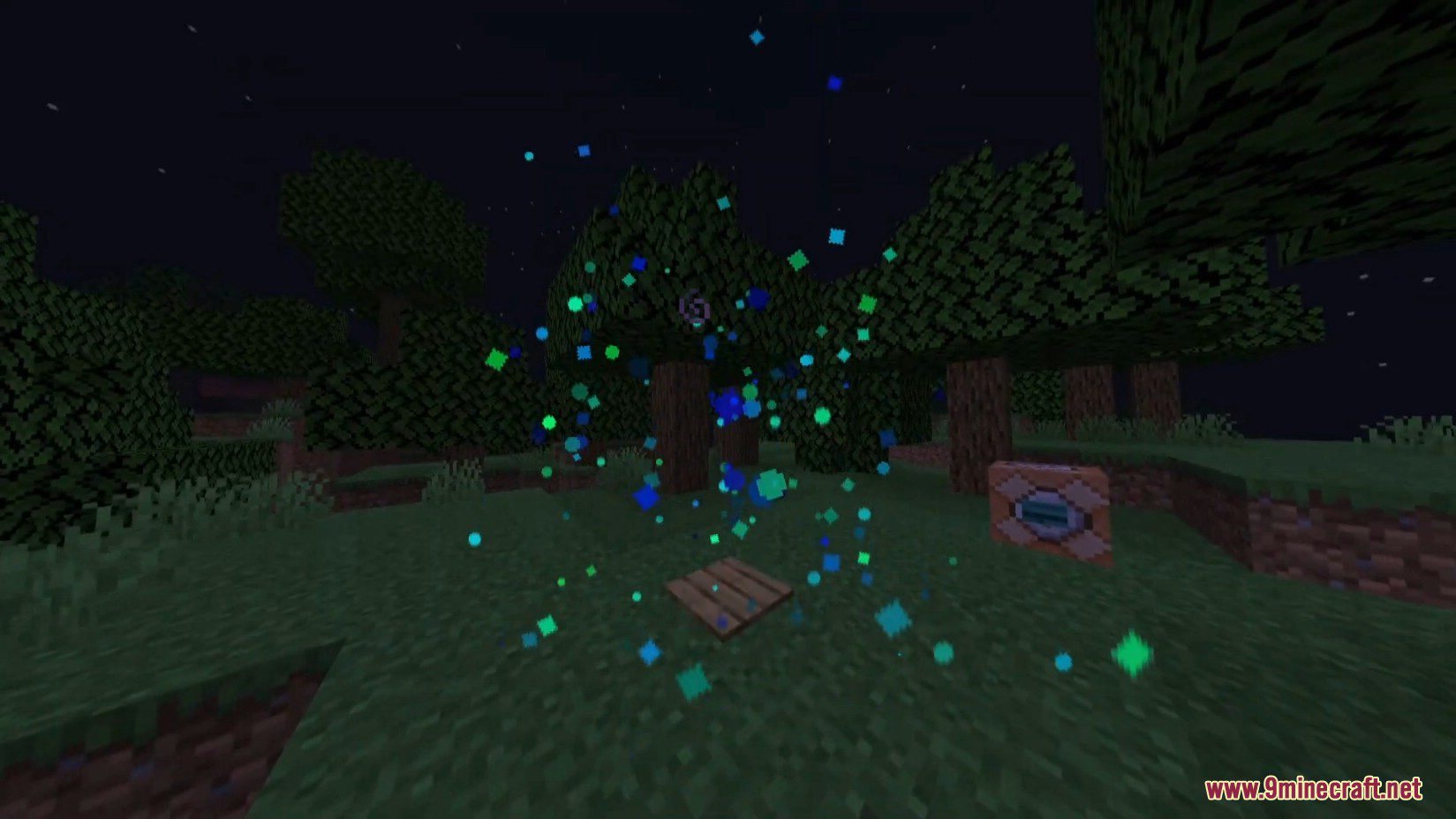
Custom Totem Particles Mod (1.21.4, 1.20.1) makes your totem particles flashier.
Screenshots:
Configs:
Categories
The configuration of the particle is split up into categories, which can be enabled and disabled at any time.
General
Global mod toggle – enable / disable the mod completely.
Particle type – replace the totem particle with a different kind, for example criticals (this option ignores most parameters)
Multiplier – see more or less particles when you pop a totem
Show own totem particles – whether or not to show particles from yourself.
Emitter settings (The emitter is what makes the particles coming from the player)
Emitter lifetime – how long the particle will emit particles for (game default is 30 ticks)
Vertical offset – move the emitter up or down
Emitter moves with player – if enabled, the emitter will move with the player
Misc
Hide on ground – particles will be hidden when they touch the ground
Collisions – Whether or not particles will collide with blocks
Color
Blend colors – If enabled, will take the first two given colors and set the particle’s color to a random color inbetween them, making a nice gradient
Starting color – you can now add as many starting colors as you want; if you want colors to appear more often than others, just add a duplicate entry
Color transitions – you have two seperate transitions, explained more below
Fade to color – the target color to start fading to
Fade speed – how fast to fade to that color
Fade at % – at what percent of the particle’s lifetime to fade at (e.g. if the lifetime is 60 ticks, 50% will start fading after 30 ticks)
Alpha
Minimum / Maximum alpha – randomly chooses an opacity of the particle between the specified values
Fade out / Fade on ground – Specify when and how fast to fade out when the particle reaches a specific age / is on the ground
Scale
Minimum / Maximum scale – randomly chooses a scale between the specified values
Scale over time / Scale on ground – specify when and how fast to scale when the particle reaches a specific age / is on the ground
Age
Minimum / Maximum age – randomly choose a age for how long the particle exists in ticks
Movement
Minimum / Maximum velocity multiplier – randomly choose a velocity multiplier for the particle
Custom velocity
Customize min/max X,Y and Z velocity independently!
Gravity
Minimum / Maximum starting gravity
Gravity over time, change gravity at set speed at set lifetime
Rotation
Minimum / Maximum starting rotation
Minimum / Maximum rotation speed
Rotate on ground – whether or not to rotate particles when they are on the ground
Default Minecraft values
Gravity = 1.25
Velocity multiplier = 0.6
Scale = 0.75
Age = 60-72
Emitter age – 30
Requires:
Fabric Loader
Fabric API
How to install:
How To Download & Install Mods with Minecraft Forge
How To Download & Install Fabric Mods
Don’t miss out today’s latest Minecraft Mods
Custom Totem Particles Mod (1.21.4, 1.20.1) Download Links
For Minecraft 1.18.2
Fabric version: Download from Server 1
For Minecraft 1.19
Fabric version: Download from Server 1
For Minecraft 1.19.1
Fabric version: Download from Server 1
For Minecraft 1.19.2
Fabric version: Download from Server 1
For Minecraft 1.19.3
Fabric version: Download from Server 1
For Minecraft 1.19.4
Fabric version: Download from Server 1
For Minecraft 1.20.1, 1.20
Fabric version: Download from Server 1 – Download from Server 2
For Minecraft 1.20.2
Fabric version: Download from Server 1
For Minecraft 1.20.4, 1.20.3
Fabric version: Download from Server 1 – Download from Server 2
For Minecraft 1.20.6
Fabric version: Download from Server 1 – Download from Server 2
For Minecraft 1.21.1
Fabric version: Download from Server 1 – Download from Server 2
For Minecraft 1.21.4
Fabric version: Download from Server 1 – Download from Server 2