https://www.aadhu.com/wp-content/uploads/2025/06/Mini-Debug-Menu-Pack-121-MCPEBedrock.png
Mini Debug Menu Pack (1.21) brings some features of the Java Edition Debug Menu to Bedrock. It provides essential in-game information to enhance gameplay for players, especially those who need technical details.

Features:
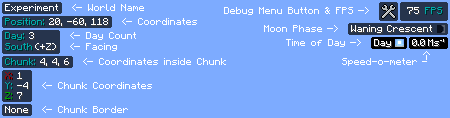
- World Name: Displays the name of the current world.
- Day Count: Shows the current day in the world (requires “Show days played” setting to be enabled).
- Direction: Indicates the direction the player is facing.
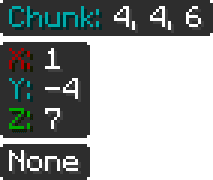
- Chunk Coordinates: Shows the player’s location within a chunk and the chunk’s location in the world.
- FPS Counter: Displays the current frames per second.
- Moon Phase: Shows the current moon phase.
- Time of Day: Indicates the in-game time (e.g., Day, Noon).
- Speed-o-meter: Measures the player’s speed.
- Toggle Button: Includes a button to toggle the debug menu on Android/iOS devices (also supports F8 key on other platforms if set up).
Screenshots:







How to install:
How To Install Mod / Addon on Minecraft PE
How To Install Texture Packs on Minecraft PE
How To Install Map on Minecraft PE
Mini Debug Menu Pack (1.21) Download Links
For Minecraft PE/Bedrock 1.21, 1.20
mcpack: Download from server 1 – Download from server 2