Description
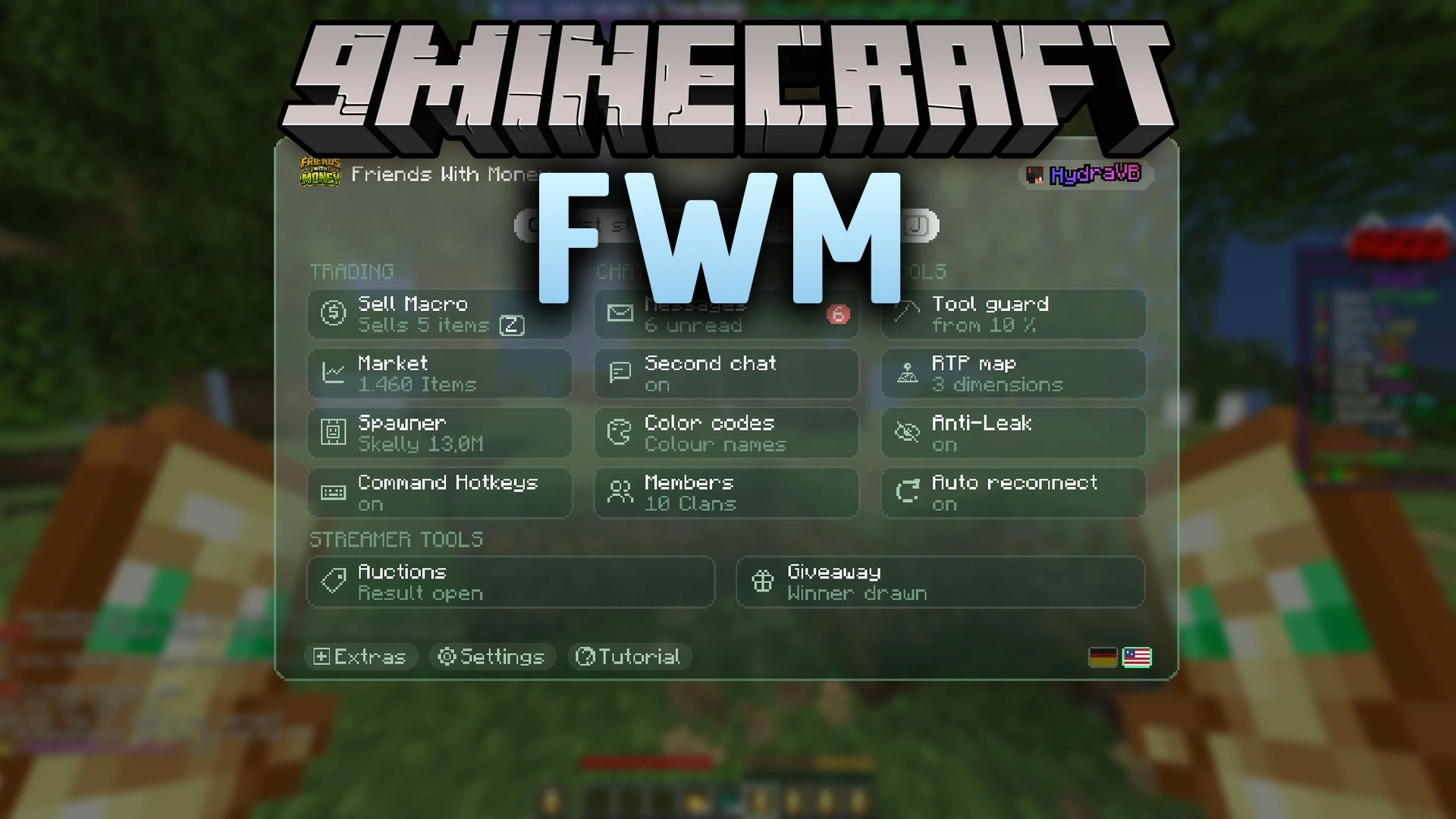
FWM Mod automates item sales and tracks economy data directly from your client. It keeps the shop window open, moves inventory items automatically, and counts your earnings across every session. The tool also displays current market values, spawner prices, and random teleport spots without leaving the game. You can run community auctions, set up chat giveaways, and customize text colors with minimal setup.

Features
- Sell Macro: Opens the server shop interface and clicks items in automatically until full.
- Profit Tracking: Records income from chat notifications and calculates hourly farming averages.
- Minute Test: Runs a sixty-second timer to test how much money your farm makes.
- Market Browser: Shows server item values and alerts you when bargains appear.
- Teleport Map: Displays recorded random teleport points across the Overworld, Nether, and End.
- Auction Manager: Tracks player bids made through money transfers and handles giveaway rolls.
- Calculates multiplier projections to show potential profits under boosted rates.
- Lists spawner purchase and sale values in an organized reference table.
- Adds a color code editor with character counters for item names and sign text.
- Lets you bind quick chat commands to custom keys with optional confirmation presses.
- Runs background data checks quietly to keep your game running smoothly.
- Includes full language toggles for English and German directly inside the settings.
Requirements
Fabric Loader RequiredFabric API Required
Installation
New to Minecraft? Follow our step-by-step guide to install Mods on your PC.View Guide
📥 FWM Mod Download Links
📦
For Minecraft
26.3
🔗 Download from Server 1
— 🔗 Download from Server 2
📦
For Minecraft
26.2
🔗 Download from Server 1
— 🔗 Download from Server 2
📦
For Minecraft
26.1.2,
26.1.1,
26.1
🔗 Download from Server 1
— 🔗 Download from Server 2
📦
For Minecraft
1.21.11
🔗 Download from Server 1
— 🔗 Download from Server 2
📦
For Minecraft
1.21.10,
1.21.9
🔗 Download from Server 1
— 🔗 Download from Server 2
📦
For Minecraft
1.21.8,
1.21.7,
1.21.6
🔗 Download from Server 1
— 🔗 Download from Server 2
📦
For Minecraft
1.21.5
🔗 Download from Server 1
— 🔗 Download from Server 2
📦
For Minecraft
1.21.4
🔗 Download from Server 1
— 🔗 Download from Server 2